

Workday setup
Workday needs things the other three boards don't: an account per employer, a structured address, and a work history it otherwise mangles out of your resume. Step 3 of onboarding covers it, and there's no prompt asking whether you use Workday — if you never open one, nothing you set here is ever used.

The editor
Onboarding's step 3 and the standalone Workday settings page (opened from the popup's Workday tab) render the same editor component, so there's no cut-down version to drift out of sync.
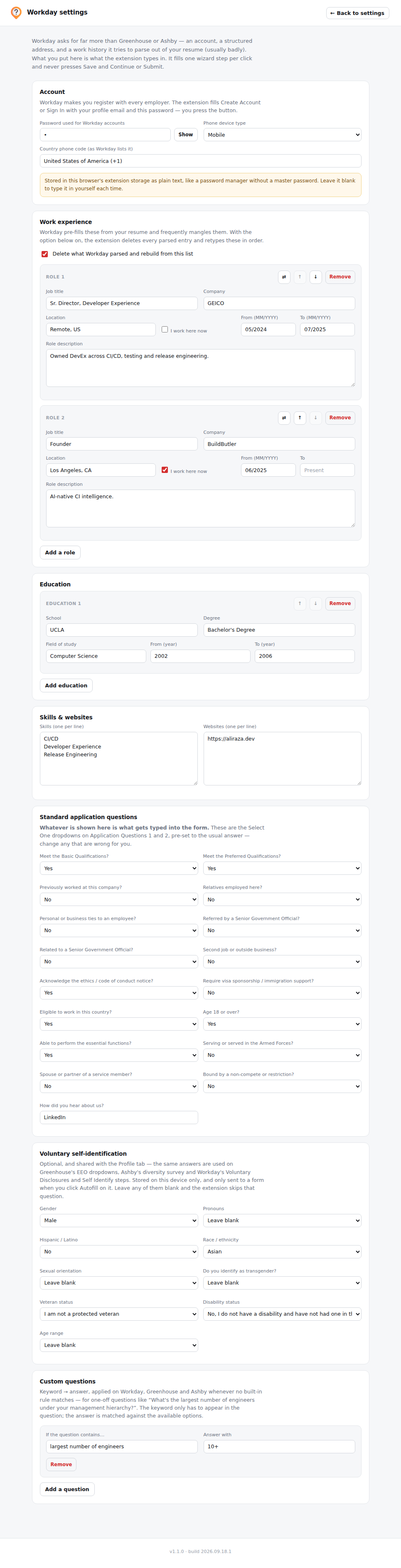
It covers:
- Account password — used to fill Create Account / Sign In steps (and Verify Password). jobwhat ticks the terms checkbox for you there; you click the button.
- Work history — prefilled from your resume, editable here. Roles reorder with ↑ / ↓, and ⇄ swaps job title and company when the resume line was "Company — Title" and the parser guessed the wrong way round.
- Education — same treatment as work history.
- Skills and websites — used on Workday's My Experience step.
- Phone device type and country phone code — Workday's own dropdown wording, filled through its button-and-listbox widgets.
- Voluntary self-identification — the same fields as the Profile tab's section of that name; filled once, used on both.
- Custom question answers — keyword → answer pairs for one-off questions any board asks. See Answer-and-remember.
How the wizard fill works
Workday is a wizard, so the on-page badge works one step at a time: fill → you read it → you click Save and Continue → the badge re-arms itself on the next step. It never presses Save and Continue or Submit for you. Steps are detected from the heading, the password-field count, and which data-automation-id sections are present.
| Step | What's filled |
|---|---|
| Create Account / Sign In | Email, password, Verify Password, and the terms checkbox |
| My Information | Names, address, city, state, postal code and phone through the generic engine; Country, State, Phone Device Type and Country Phone Code through Workday's own button-and-listbox and multiselect widgets |
| My Experience | Attaches your resume, then (by default) deletes every role Workday parsed out of it and retypes your saved history in order — including the split MM/YYYY date spinbuttons and "I currently work here." Education, websites and skills are rebuilt the same way. Turn the rebuild off in the editor if you'd rather keep what Workday guessed. |
| Application Questions 1 & 2 | Your saved defaults per question (meets basic quals, worked here before, relatives employed, sponsorship, age 18+, essential functions, non-compete, armed forces…), then custom Q&A, then your profile |
| Voluntary Disclosures / Self Identify | Gender, pronouns, Hispanic/Latino, race, sexual orientation, transgender, veteran, age range; the CC-305 name and today's date; and the disability checkbox matching your saved answer. Anything left blank is skipped. |
Workday ids are targeted first, and every lookup falls back to label matching, so a renamed id degrades rather than breaks. If a step fills only partly, the badge lists what it skipped by label — that's the report of what changed on Workday's end.
Application Questions defaults
The two Application Questions pages are answered from a set of saved yes/no and text defaults — sensible defaults you can change in the editor before you ever hit a real form:
- Meet the Basic/Preferred Qualifications? (Yes)
- Previously worked at or consulted for this company? (No)
- Relatives employed here? (No)
- Personal or business ties to an employee? (No)
- Referred by / related to a Senior Government Official? (No)
- Second job or outside business? (No)
- Require visa sponsorship / immigration support?
- Eligible to work in this country?
- Age 18 or over? (Yes)
- Able to perform the essential functions? (Yes)
- Serving or served in the Armed Forces? (No)
- Spouse or partner of a service member? (No)
- Bound by a non-compete or restriction? (No)
- How did you hear about us? (default: LinkedIn)
Anything the built-in defaults don't cover falls through to your custom Q&A, then to your profile.