The Metrics tab
The job log's Log | Metrics switch (also tracker.html?view=metrics, and the Metrics link in the popup footer) shows what autofill has actually been worth.
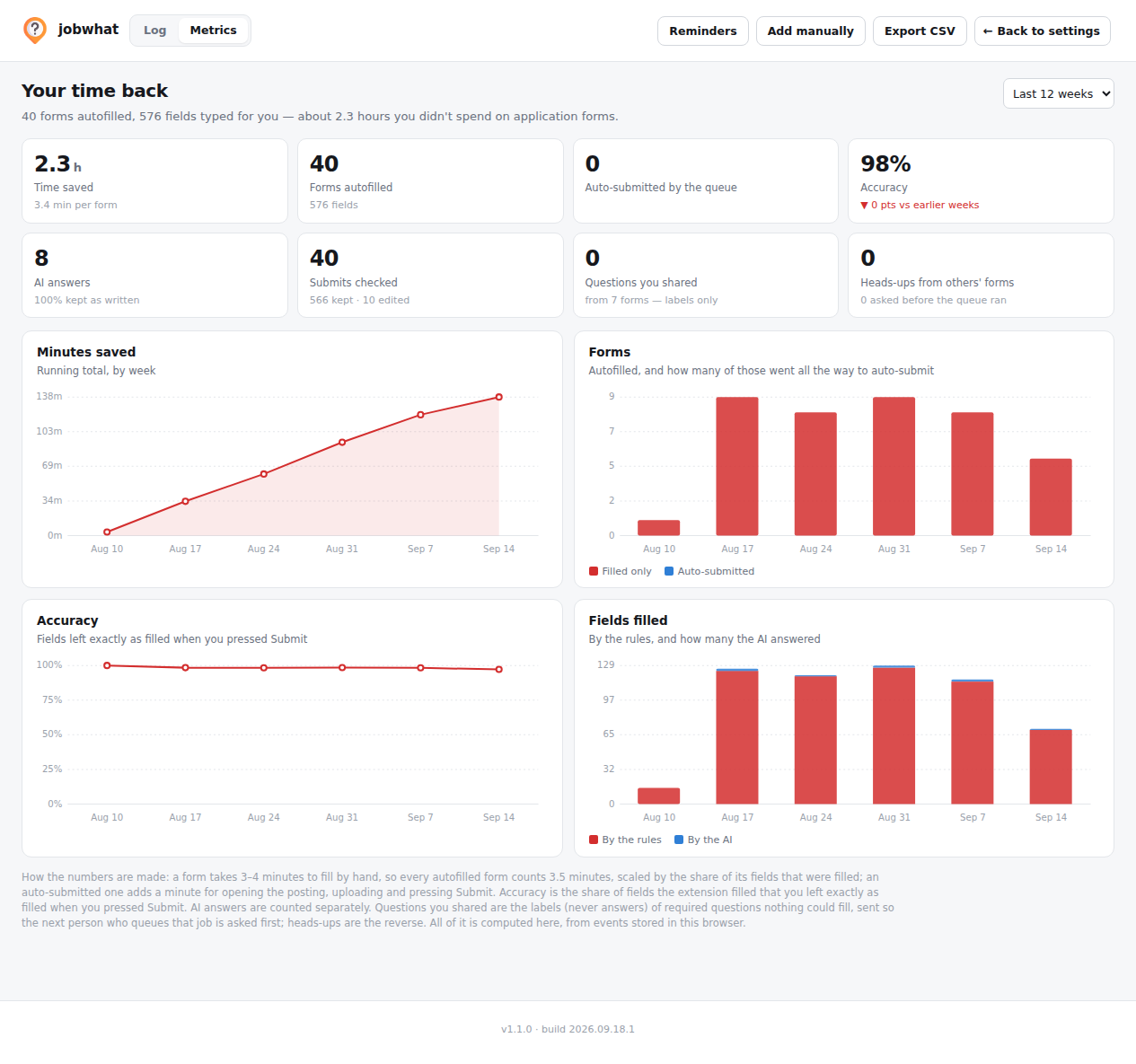
The numbers
| Metric | What it means |
|---|---|
| Time saved | 3.5 minutes per form × the share of its fields that were filled (floor 25%), plus 1 minute when the queue also submitted it |
| Forms autofilled | Count of fills, with total fields filled underneath |
| Auto-submitted by the queue | From the job log's Auto-submitted rows |
| Accuracy | Kept ÷ (kept + changed) — see below |
| AI answers | How many fields the AI answered, and what share you kept as written |
| Submits checked | How many submitted forms were re-verified against what was filled |
| Questions you shared | Required questions nothing could answer, shared so the next person who queues that job is asked up front |
| Heads-ups from others' forms | The reverse — questions you were asked before a queue run, because someone else hit them first |
Four weekly charts sit below the numbers, all inline SVG with no charting library: minutes saved (running total), accuracy, and two stacked bars — auto-submitted stacked inside autofilled, and AI-answered fields stacked inside all filled fields — since each is a subset of the other, not a separate quantity worth its own axis.
How accuracy is measured
Two events are recorded per application, capped at 4,000 (newest kept):
- A fill —
filled,skipped,ai,auto, and which platform — recorded after every autofill. - A submit — recorded when the form is actually submitted. It re-reads every field jobwhat filled and counts each one as kept if it still holds exactly what was filled, or changed if you edited it before submitting. AI answers are counted separately (
aiKept/aiChanged).
Accuracy = kept ÷ (kept + changed). It's a measure of how often the fill was right the first time, from data that never leaves your browser.
Community stats
Alongside your own numbers, Metrics shows a community line — total forms and fills recorded across everyone using the form-sharing network — refreshed at most once a day. This is the only place jobwhat shows you anyone else's numbers, and it's aggregate only: your own answers are never in it, and neither is anyone else's.
All of this — your numbers, the charts, the log they're built from — stays in the browser. There's no dashboard anywhere else to check.